
The Certificates by Signing Algorithm panel on the dashboard shows a bar chart of all active certificates synchronized to Keyfactor Command from a Microsoft CA A certificate authority (CA) is an entity that issues digital certificates. Within Keyfactor Command, a CA may be a Microsoft CA or a Keyfactor gateway to a cloud-based or remote CA. or Keyfactor CA gateway or imported via SSL TLS (Transport Layer Security) and its predecessor SSL (Secure Sockets Layer) are protocols for establishing authenticated and encrypted links between networked computers. scanning, certificate store inventorying, or manual import broken down by signing algorithm. Hover over a bar to see the number of active certificates in the category. By default, all certificates in the Keyfactor Command database are included. To include only selected CAs or gateways, click the panel Settings icon and choose Edit. In the Edit dialog, select the CAs you wish to include in the panel. To filter out certificates brought into the database via SSL scanning, certificate store inventorying, and manual import, select specific CAs and uncheck the Certificates Not Associated with CA option.
Click the Hide button to minimize the display. Click the panel Settings icon  to remove or rename the panel or change the comparison date for the display (see Dashboard).
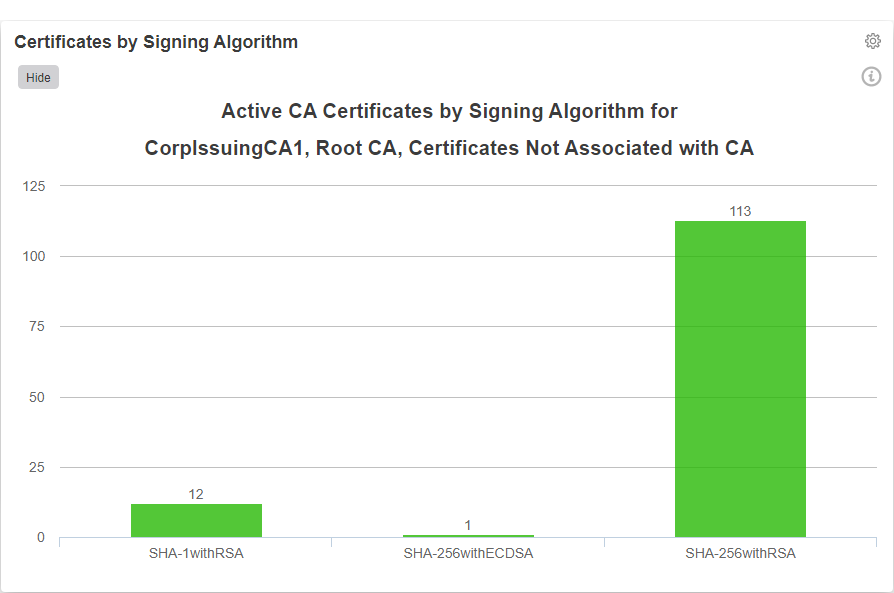
Figure 15: Dashboard Certificates by Signing Algorithm